
Destiny 2 Cheat Buying Guide: Features, Pricing and Support
A buyer-focused guide to reviewing actual features, price, system requirements, support terms and account risks before considering third-party software.
A product page should answer more than whether a feature name appears in a list. Before considering third-party game software, review the exact functions, supported version, system requirements, total cost and support terms. Missing information should be treated as a question to resolve, not an invitation to assume the best.
This guide focuses on the features provided for the Destiny 2 product and the information a buyer should confirm before proceeding.
1. Check the exact feature list
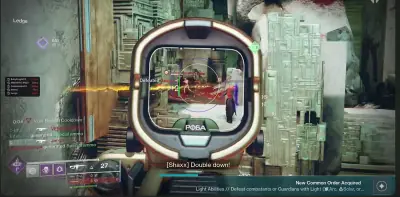
The supplied feature set includes Aimbot, Player ESP, Loot ESP, 2D Radar and a Miscellaneous section. Additional named options include recoil control, Triggerbot, No Spread, movement speed boost and Stream-Proof mode.
Read the feature descriptions rather than relying on broad phrases such as "all features" or "complete menu". Confirm which controls are currently available and whether any listed option has limitations.
2. Confirm game and build compatibility
A product name containing Destiny 2 does not establish support for every game build, platform or activity. Ask which exact game version is supported, how updates are handled and whether there are known limitations.
Do not assume that a feature works in every PvE or PvP activity. Request a clear answer for the activity you intend to play.
3. Ask for complete system requirements
The Destiny 2 feature details supplied for this article do not include a confirmed Windows version, processor requirement, memory requirement, graphics requirement or installation prerequisites. These details should be published only when verified.
Before making a purchase decision, check the current system requirements and whether the product needs additional services or hardware. Avoid changing security settings based on unofficial instructions.
4. Verify the full price and access period
No Destiny 2 product price or subscription duration was included in the information supplied for this article. Check the live product page for the current amount, currency, access period, renewal rules and any separately required services.
Ask whether taxes or payment fees are added at checkout and whether a subscription renews automatically. Do not rely on a price quoted in an old screenshot or an unrelated product listing.
5. Review support and refund terms
Look for a support route, current documentation, expected response channel and clear refund or cancellation terms. If the product requires a separate service, ask whether that service has its own price and renewal period.
A useful support answer should address the exact product version and system configuration rather than offering a generic assurance.
6. Understand the account-policy risk
Bungie's rules prohibit cheats, aimbots, autofire and certain external tools used to gain a gameplay advantage. Bungie may restrict or ban accounts or devices. A seller's product description cannot override Bungie's policies.
Do not purchase on the basis of claims such as "undetectable", "ban-proof" or "guaranteed safe" unless those claims are independently and credibly substantiated. The information supplied for this product does not establish any such guarantee.
Before you decide
A sound purchase decision depends on verifiable details, not a long feature list. Confirm the current features, exact build support, system requirements, complete price, additional service requirements and support terms. Then weigh those facts against the account and device risks described by Bungie.
Start with the Destiny 2 product details, review the FAQ, and contact support if a material question remains unanswered.