PREMIUM DESTINY 2 CHEATS

Destiny 2 Cheats for PC. Aimbot, Player ESP, Loot ESP & 2D Radar.

Explore Destiny 2 Cheats for PC featuring customizable Aimbot, Player ESP, Loot ESP and 2D Radar. Fine-tune targeting with adjustable FOV, smoothness and bone selection, customize player and loot indicators, and configure radar range, size and additional combat features.

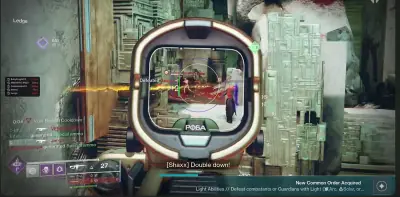
Destiny 2 gameplay screenshot 1 with player and targeting indicators.

Yes

Stream-safe

<24h

Patch speed

300+

Users

24/7

Support

Custom FOV
Visible Check
Player ESP
Loot ESP
Skeleton
Containers
2D Radar
Triggerbot
Menu Keybind
Windows 10 & 11
HVCI enabled
Core Isolation enabled
TPM enabled
Secure Boot enabled
Cloud DMA required for full functionality on supported builds
Custom FOV
Visible Check
Player ESP
Loot ESP
Skeleton
Containers
2D Radar
Triggerbot
Menu Keybind
Windows 10 & 11
HVCI enabled
Core Isolation enabled
TPM enabled
Secure Boot enabled
Cloud DMA required for full functionality on supported builds

Features

THE DESTINY 2 CHEATS FEATURES

Explore customizable Aimbot, Player ESP, Loot ESP, and 2D Radar features for Destiny 2. Fine-tune targeting behavior, visual indicators, item tracking, and radar settings to match your preferences. Additional customization options include recoil control, Triggerbot, movement speed boost, and Stream-Proof mode. Manage your settings through configurable hotkeys, menu controls, and dedicated cloud connectivity options.

Aimbot

Custom Targeting & Combat Controls

Customize aim assistance with adjustable targeting settings, bone selection, and activation controls. Fine-tune aiming behavior with configurable smoothness, FOV, visibility checks, and additional combat options.

  • Enable Aimbot: Toggle aim assistance on or off.
  • Aim Key & Secondary Aim Key: Configure primary and secondary activation binds.
  • Bone Selection: Select the target bone for aim assistance.
  • Custom FOV: Adjust the field of view for targeting.
  • Smoothness: Fine-tune aim movement behavior.
  • Visible Check: Configure targeting to account for visible targets.
  • Draw FOV: Toggle the on-screen FOV indicator.
  • While ADS: Configure aim assistance while aiming down sights.
  • Recoil Control: Enable recoil adjustment with customizable strength.
  • Triggerbot: Configure automatic trigger activation, keybind, and delay.
  • No Spread: Access an additional spread-control setting.
Visual ESP

Player ESP & Custom Visual Indicators

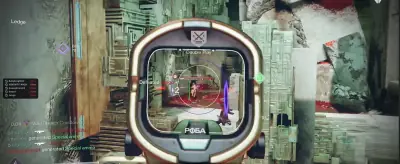
Customize how player information and character positions appear on screen. Configure player highlights, box styles, skeleton indicators, and visibility checks to tailor your visual experience.

  • Player ESP: Enable player visual indicators.
  • Box ESP: Highlight player positions with a configurable box style, including Corner mode.
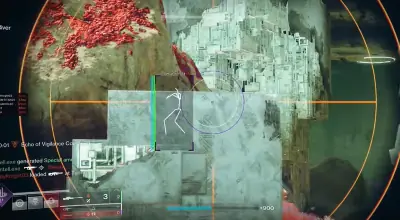
  • Skeleton ESP: Display skeleton overlays for character identification.
  • Visible Check: Enable visibility-based visual filtering.
  • ESP Strength: Adjust the strength of visual indicators.
  • Movement Speed Boost: Access an additional movement speed setting.

World ESP & Radar

Loot Tracking & Customizable 2D Radar

Access world-related visual tools to display loot, containers, player names, and distance information. Use the customizable 2D Radar to monitor supported entities with adjustable range and display size.

  • Loot / Item ESP: Display loot and item indicators.
  • Containers: Enable visual indicators for containers.
  • Show Names: Display names alongside supported entities.
  • Show Distance: View distance information on screen.
  • Loot Distance: Adjust the maximum loot display distance.
  • 2D Radar: Enable the radar interface for entity tracking.
  • Show Enemies: Toggle enemy indicators on the radar.
  • Show Team: Configure teammate visibility.
  • Radar Range: Adjust the radar's tracking range.
  • Radar Size: Customize the radar display size.

Miscellaneous

Interface Customization & System Controls

Manage additional software settings, interface shortcuts, and configuration options from the Misc panel. Customize menu controls, use Stream-Proof mode, and monitor the available cloud connection services.

  • Stream-Proof: Enable Stream-Proof mode.
  • Menu Keybind: Customize the shortcut used to open the menu.
  • Panic Key: Configure a dedicated panic shortcut.
  • Save / Load Config: Manage and switch between saved configurations.
  • Hotkeys: Enable and manage shortcut controls.
  • Cloud DMA: Secure tunnel connection status.
  • AWS: Cloud relay connection status.

AIMBOT FEATURES

Customizable Aimbot & Advanced Targeting

Configure your aim assistance with customizable activation controls, adjustable FOV, and dedicated targeting options. Fine-tune bone selection, aim smoothness, and visibility checks while managing recoil control and additional aiming features. Customize your aiming setup with flexible keybinds and adjustable combat settings.

Aim Activation

Flexible Aimbot Activation Controls

Manage when and how the Aimbot activates through dedicated toggles and customizable mouse keybinds.

  • Enable or disable Aimbot independently.
  • Configure a primary Aim Key.
  • Assign a secondary Aim Key.
  • Enable While ADS for aim assistance while aiming down sights.
  • Customize your preferred activation controls.

FOV & Aim Smoothness

Custom Targeting Area & Smooth Aim Movement

Adjust the targeting field of view and aim smoothness to customize the Aimbot's behavior and movement.

  • Adjustable Field of View (FOV).
  • Customize aim smoothness.
  • Fine-tune aiming movement behavior.
  • Configure your preferred targeting settings.

Bone Selection

Customizable Character Target Points

Choose your preferred character bone for aim assistance using the dedicated bone selection menu.

  • Configure the target bone.
  • Select your preferred aiming point.
  • Head selection available in the displayed configuration.
  • Customize your preferred bone settings.

Visibility & FOV Display

Dedicated Visibility Checks & FOV Indicators

Customize visibility checks and control whether the targeting field of view appears on screen.

  • Enable or disable Visible Check.
  • Configure visibility-based targeting.
  • Enable or disable Draw FOV.
  • Display the FOV indicator during gameplay.

Recoil Control

Adjustable Weapon Recoil Customization

Configure the dedicated recoil control feature with an independent toggle and adjustable recoil strength.

  • Enable or disable Recoil Control.
  • Adjust Recoil Strength.
  • Fine-tune recoil settings.
  • Customize your preferred recoil configuration.

Triggerbot & No Spread

Additional Shooting Customization

Access additional shooting options with configurable Triggerbot activation controls and a dedicated No Spread setting.

  • Enable or disable Triggerbot.
  • Configure a custom Trigger Key.
  • Adjust Trigger Delay.
  • Enable or disable No Spread.
  • Customize available shooting settings.

VISUAL ESP FEATURES

Player ESP, Wallhack & Character Indicators

Access customizable visual features for additional in-game awareness. Configure Player ESP, character box styles, skeleton indicators, and visibility checks while adjusting ESP strength to personalize your visual settings. Destiny 2 also includes wallhack functionality for spotting enemies through obstacles.

Player ESP

Custom Player Visual Indicators

Enable Player ESP to display additional visual information for player entities during gameplay.

  • Independently enable or disable Player ESP.
  • Display player visual indicators.
  • Customize the ESP configuration.
  • Combine Player ESP with other available visual settings.

Box ESP

Customizable Character Box Indicators

Configure box-style visual indicators to customize how character positions are highlighted on screen.

  • Enable and configure Box ESP.
  • Select the available box display style.
  • Corner box style shown in the configuration.
  • Customize your preferred box appearance.

Skeleton ESP

Character Skeleton Visualization

Use the Skeleton ESP option to display skeletal visual indicators for supported character entities.

  • Enable or disable Skeleton ESP.
  • Configure the skeleton display option.
  • Customize your visual indicators.
  • Manage skeleton settings independently.

Visible Check & ESP Strength

Adjustable ESP Visibility & Strength

Fine-tune your visual configuration with dedicated visibility checks and an adjustable ESP strength slider.

  • Enable or disable Visible Check.
  • Configure visibility-based ESP filtering.
  • Adjust ESP Strength.
  • Customize the intensity of visual indicators.

Wallhack

Enhanced Enemy Visibility Through Obstacles

Access wallhack functionality designed to provide additional visibility of enemies through environmental obstacles.

  • Wallhack functionality included in the Destiny 2 feature set.
  • Spot enemies through obstacles.
  • Complement your visual ESP configuration.
  • Customize your overall visual experience.

WORLD ESP & RADAR FEATURES

Loot Tracking, Item ESP & Custom 2D Radar

Customize world-related visual indicators to monitor loot, containers, and supported entities. Enable name and distance information, adjust loot display distance, and configure the 2D Radar with independent enemy and team visibility settings. Fine-tune radar range and display size to personalize your in-game tracking interface.

Loot & Item ESP

Custom Loot & Item Detection

Configure Loot / Item ESP to display available item indicators and customize your world-related visual settings.

  • Enable or disable Loot / Item ESP.
  • Display available loot indicators.
  • Customize item-related visual settings.
  • Manage loot visibility independently.

Container ESP

Dedicated Container Visual Indicators

Enable container indicators to include additional world-related information in your visual interface.

  • Enable or disable Containers.
  • Display supported container indicators.
  • Manage container visibility independently.
  • Customize your world ESP setup.

Names & Distance ESP

Additional Entity Information

Display names and distance information through dedicated world ESP settings for a more customizable visual interface.

  • Enable or disable Show Names.
  • Display supported entity names.
  • Enable or disable Show Distance.
  • Display distance information for supported entities.

Loot Distance

Adjustable Loot Display Range

Customize how far away loot indicators can appear with the dedicated Loot Distance slider.

  • Adjust the Loot Distance setting.
  • Customize the preferred display range.
  • Fine-tune loot visibility distance.
  • Manage your preferred loot tracking range.

2D Radar

Customizable In-Game Radar Interface

Enable the 2D Radar to access an additional visual tracking interface with adjustable display and entity visibility options.

  • Enable or disable 2D Radar.
  • Display the radar interface.
  • Customize radar-related settings.
  • Manage available radar indicators.

Enemy & Team Radar

Individual Enemy & Teammate Indicators

Choose which supported entity categories appear on the radar through separate enemy and team visibility controls.

  • Enable or disable Show Enemies.
  • Configure enemy radar indicators.
  • Enable or disable Show Team.
  • Manage teammate visibility independently.

Radar Range & Size

Adjustable Radar Display Controls

Personalize the radar interface with independent range and size sliders to customize your preferred radar configuration.

  • Adjust Radar Range.
  • Customize Radar Size.
  • Fine-tune radar tracking range.
  • Configure the preferred radar display dimensions.

ADDITIONAL FEATURES

Movement Boost, Stream-Proof & Menu Customization

Explore additional customization settings through the Miscellaneous menu. Configure movement speed boost, enable Stream-Proof mode, manage saved configurations, and customize menu shortcuts. Access dedicated Cloud DMA and AWS connection information for supported cloud connectivity.

Movement Speed Boost

Additional Movement Customization

Access the dedicated movement speed boost setting to customize the available movement-related feature.

  • Enable or disable Movement Speed Boost.
  • Manage the movement boost option independently.
  • Customize your movement-related configuration.

Stream-Proof

Dedicated Stream-Proof Mode

Enable the Stream-Proof option through the General settings to access the software's dedicated streaming-related display mode.

  • Enable or disable Stream-Proof.
  • Manage Stream-Proof independently.
  • Configure the available general settings.

Save & Load Configuration

Convenient Configuration Management

Manage your software configuration through dedicated Save / Load Config controls.

  • Enable or disable configuration management.
  • Save your preferred configuration.
  • Load saved configurations.
  • Manage your preferred settings.

Hotkeys & Menu Controls

Customizable Shortcuts & Interface Access

Personalize menu access and shortcut controls using dedicated keybind settings.

  • Enable or disable Hotkeys.
  • Configure your Menu Key.
  • Set a dedicated Panic Key.
  • Customize preferred keyboard shortcuts.
  • Manage available menu controls.

Cloud DMA & AWS

Dedicated Cloud Connectivity Services

Access connection information for the supported cloud services through the dedicated Cloud panel.

  • Cloud DMA: Secure tunnel connection status.
  • AWS: Cloud relay connection status.
  • View the available connection indicators.
  • Monitor the displayed cloud connection status.

Store

Our products

Compare the cheat menu and the utilities on this grid. Open a product page for the feature list and checkout.

Cloud DMA

A Hyper-V environment for one Windows PC with guided installation and encrypted activation.

Cloud DMA requires GREENWARD, Static Server and AWS as separate purchases. Confirm the full setup and Destiny 2 compatibility before ordering.

  • Single-PC setup
  • Guided Hyper-V installation
  • Encrypted activation

Why us

Features and support for Destiny 2

Explore the targeting controls, visual tools and product guidance available before checkout.

  • Separate aim controls

    Configure FOV, smoothness, bone selection and primary or secondary activation keys.

  • Player visuals

    Choose box and skeleton indicators, visibility filtering and ESP strength.

  • Loot and containers

    Control item indicators independently and adjust the loot display distance.

  • Stream-Proof setting

    The menu includes Stream-Proof mode. Confirm behavior with your recording application.

  • Save and load configurations

    Save your preferred settings and load them through the configuration controls.

  • Review the full setup

    Cloud DMA is required for full functionality on supported builds. Review its separate dependencies before ordering.

<24h

Patch turnaround

Usual time to ship a loader after a big Destiny 2 or BattlEye update.

24/7

Support

Discord help for setup, configs and account issues.

300+

Users

PC players using aimbot, ESP and tools on destinycheat.com.

Setup guide

Before ordering, review your complete setup

Read the feature list and requirements, confirm unresolved compatibility questions, then review the destination checkout.

  1. Review the feature list

  2. Confirm compatibility

  3. Review purchase options

How it works

From product research to an informed purchase.

Review the complete configuration before choosing an access option.

4 checks before purchase

  1. 01

    Read the feature list

    Review targeting, ESP, Radar and interface options on the main product page.

  2. 02

    Check your Windows setup

    Check Windows 10 or 11 and the required HVCI, Core Isolation, TPM and Secure Boot settings.

  3. 03

    Ask about the complete configuration

    Confirm where Destiny 2 runs with Cloud DMA and account for GREENWARD, Static Server and AWS.

  4. 04

    Review the destination checkout

    Check current pricing, access terms and delivery details with the seller before paying.

Blog

Guides and updates

Feature explanations, Windows requirements and gameplay guides for Destiny 2.

A structured way to document a product issue and contact support without changing security settings or attempting unsupported workarounds.

A straightforward guide to the enemy, team, range and size controls named in the Destiny 2 2D Radar feature list.

A practical checklist covering game version, Windows requirements, additional services and Bungie's published PC application restrictions.

System requirements

Check your PC before purchasing

Review the Windows security settings and separate requirements for the supported configuration.

Windows

Windows 10 or Windows 11, 64-bit.

Windows security

HVCI and Core Isolation must be enabled.

Firmware security

TPM and Secure Boot must be enabled.

Cloud DMA

Required for full functionality on supported builds. Purchased separately.

Support

Need a hand with your setup?

Find answers to common questions or contact support about an order, compatibility, or a technical issue.

Before you reach out

Details that help us help you

  1. 01

    Order details

    Include your order number when asking about a purchase.

  2. 02

    Your setup

    Name the product and your Windows version.

  3. 03

    What happened

    Share the exact error message or a relevant screenshot.

FAQ

Questions about this page

Answers for this page. The FAQ page holds the rest.